Managing Administration Permissions
Note
Starting in version 8.27, permissions have been enhanced with granular access control. Upgrade to version 8.27 or later to use this feature.
The Administration section controls access to the organization-level and project-level management capabilities of QMetry.
For example, it manages users and roles, projects, releases and cycles, builds, platforms, labels, API access, reporting, notifications, customization, external tracker integrations, and continuous integration and continuous delivery (CI/CD) rules.
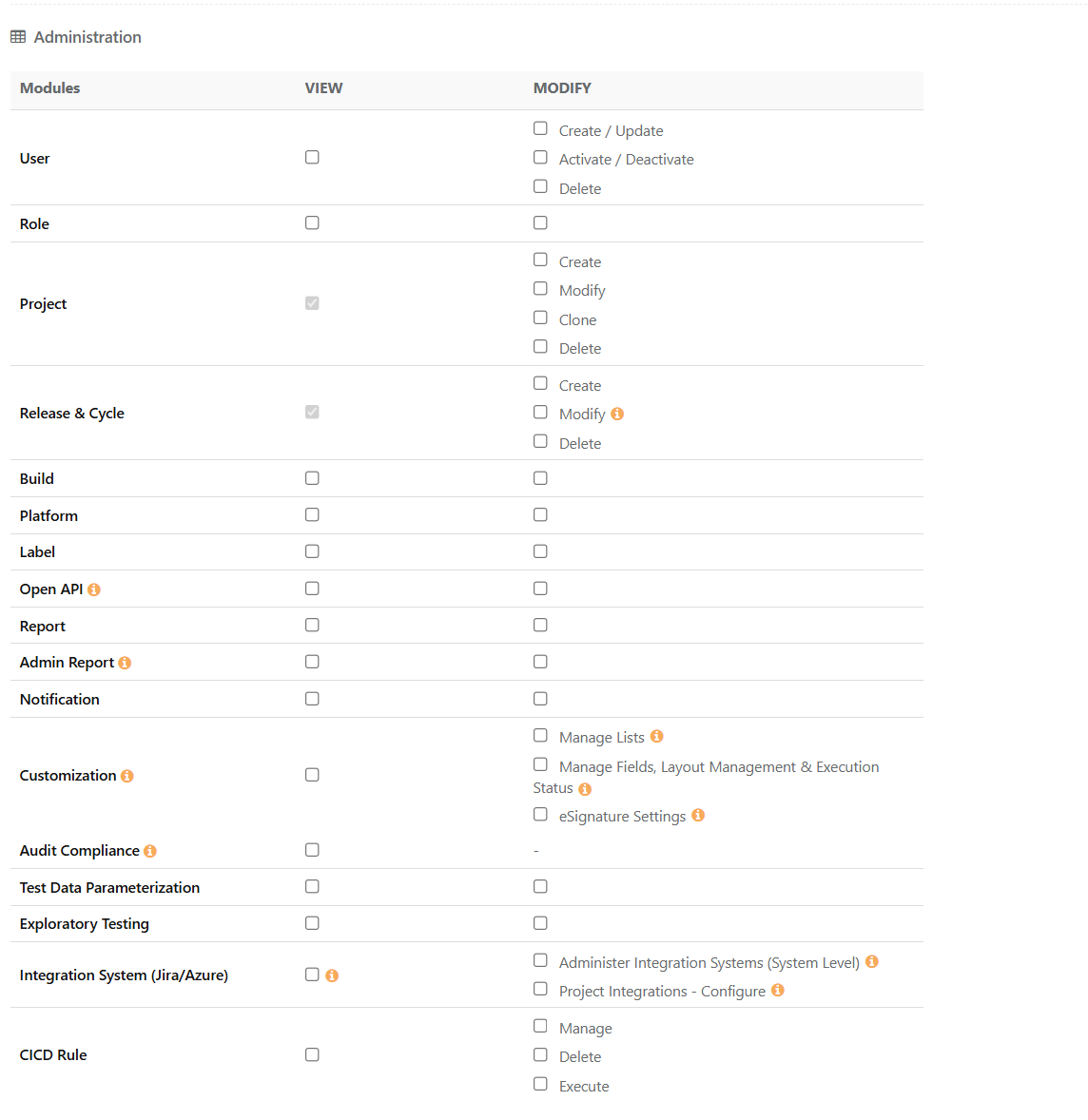 |
User
These rights are independent of each other. The deactivation controls are kept separate so that teams can create users without also being able to deactivate an existing user.
Permission | Implication |
|---|---|
View | Allows users to view the user list. |
Create or Update | Allows users to create new users and update existing user details. |
Activate or Deactivate | Allows users to activate or deactivate existing users. |
Delete | Allows users to delete users. |
Roles
This permission controls access to the Role module.
Permission | Implication |
|---|---|
View | Allows users to view the list of roles and the rights assigned to each role. |
Modify | Allows users to create, edit, and delete roles and to assign rights to them. |
Project
These rights are independent of each other. They let you assign Create, Modify, Clone, and Delete rights separately to the users who need them.
Permission | Implication |
|---|---|
View | Allows users to view the projects assigned to them. |
Create | Allows users to create projects. |
Modify | Allows users to modify and archive a project, assign user roles in projects, integrate a source code repository, rename projects, and change other project settings. Modify settings also apply to eSignature settings, Part 11 Compliance, and Auto Approve Test Executions. Roles with only the Modify Project and the Integration System (Jira and Azure) permission can manage existing linked project and work-item mappings. |
Clone | Allows users to clone only the projects assigned to them. |
Delete | Allows users to delete only the projects assigned to them. This permission does not apply to deleting releases and cycles. |
Release and Cycle
The system administrator can regulate Release and Cycle permissions as follows:
Permission | Implication |
|---|---|
View | View releases and cycles. |
Create | Create a release and cycle for a project. |
Modify | Modify and archive releases and cycles. |
Delete | Delete releases and cycles. |
Open API
Open API permissions are now independent:
Permission | Implication |
|---|---|
View | Can view the Open API page but cannot generate or regenerate the Open API Key. If a key is already generated, you can perform operations through the Open API based on the Project, Module, and other permissions. |
Modify | You can view the Open API page and generate or regenerate the Open API Key. |
Note
Existing roles that had View Integration permission gets the new Open API permissions.
Report
The QMetry System Reports module is visible only if you have View rights for the Report module. You can make changes within the module only if you have Modify rights for the Report module.
Admin Report
You can access the Login Summary Dashboard and gadgets if you have View rights for the Admin Report module. You can make changes if they have Modify rights.
The following table describes the Admin Report permissions.
Permission | Implication |
|---|---|
View | You can see the Login Summary Dashboard and gadgets, see shared dashboards, share only the Login Summary gadgets, and schedule and export dashboards that contain Login Summary gadgets. |
Modify | You can create or modify custom dashboards to add all Login Summary Gadgets. |
Notification
Permission | Implication |
|---|---|
View | Users can view all Notifications. |
Modify | Users can edit all Notifications. |
Customization
These permissions apply only to Lists, Manage Fields, Layout Management, Execution Status and Platform Attributes. These are project-specific settings.
Note
If a user does not have View Customization permission, the user can still perform all test execution operations.
Permission | Sub-Permissions | Implication |
|---|---|---|
View | - | Can view Lists, Manage Fields, Layout Management, and Execution Status settings. |
Modify | Manage Lists | Create, modify, archive, and delete Lists and List values; import and copy List values. |
Manage Fields, Layout Management & Execution Status | Perform all operations under Project mapping when editing; modify Layouts for all modules; modify Execution Status and mpdifying platform attributes. | |
eSignature Settings | Add and modify Levels and add users to Levels. |
Note
Existing roles that had Modify Customization permission receive these new Customization sub-permissions after upgrading to QMetry Version 8.27
Audit Compliance
Audit Compliance grants following rights:
Permission | Implication | |
|---|---|---|
View | For General Settings & Audit | If you have Audit or Compliance View permission but does not have View System Settings permission, you can download all three logs based on date selections, but cannot update the number of days for audit retention. |
For Reports | You need both Audit View and Report View permissions to view the Audit Log Report. For the Change Log Report, only Audit View permission is needed. |
Test Data Parameterization
“View” and “Modify” rights enables you to view and manage Test Data Parameterization for the project respectively.
Exploratory Testing
"View” and “Modify” rights enables you to view and manage Exploratory Testing for the project respectively.
Integration System (Jira or Azure)
These permissions manage Jira and Azure integrations. An info icon indicates what each permission allows and what actions it enables.
Permission | Sub-Permission | Implication |
|---|---|---|
View | Only View | Can access the Integration Settings page and manage their own Jira/Azure authentication credentials. This permission is recommended for all users. Users with Modify Issue permission are automatically granted this access. |
With Project Modify | Can manage an existing project integration. | |
With Project Modify and Integration System View permissions | Can modify the Jira or Azure settings for an existing linked Jira project. | |
Modify | Administer Integration Systems (System Level) | Can establish and configure Jira and Azure system-level integrations through Apps. Can manage integration settings, including OAuth, syncing external tracker fields to reports, and Basic Authentication for Jira Data Center when public access is disabled. Only Super Admins can assign this permission to roles. |
Project Integrations Configure | Can configure Jira and Azure integrations within a QMetry project, including creating new Jira/Azure project mappings. Users with only Project Modify permission can manage existing mappings but cannot create new ones. Only Super Admins can assign this permission to roles. |
Note
'Administer Integration Systems (System Level)' can be enabled/disabled only by Super Admin.
Issue Module
With Issue Module Modify permission along with Integration System(Jira/Azure) View permission, you can view the Integration List page and can update or revoke the credentials.
Note
This applies only to Jira/Azure-integrated projects.
CICD Rule
Permission | Sub-Permissions | Implication |
|---|---|---|
View | - | Can just view the CICD module but cannot perform any action. |
Modify | Manage | Can add and edit the CICD Rules configuration. |
Delete | Can delete the configured CICD Rules | |
Execute | Can execute the configured CICD Rules |