Test Execution Summary By Folder
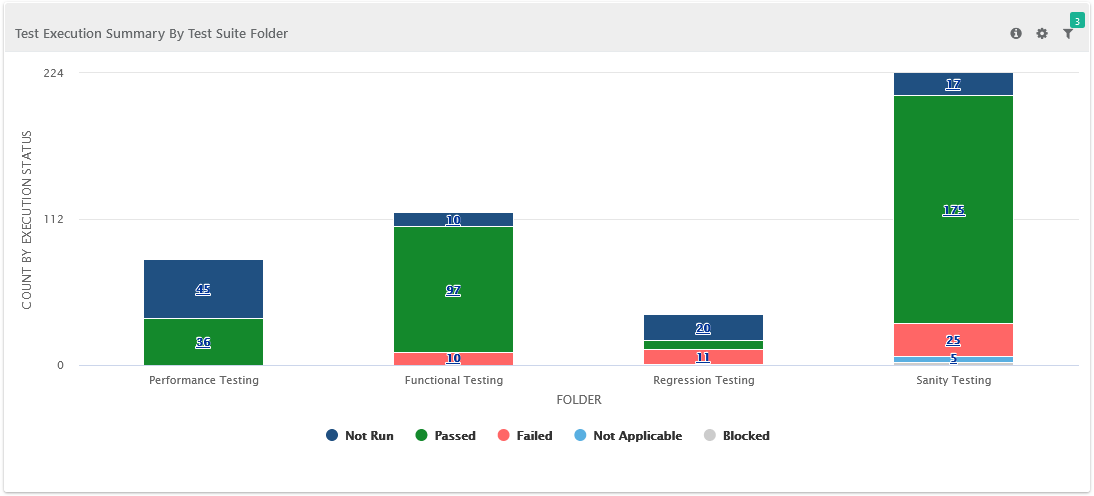
The bar chart shows test suite folders, each containing categorized test suites like integration, smoke, and regression testing. It helps QA managers visually track test suite execution and support decision-making.
Global Filters
You can use global filters to apply unified filters for project, cycle, release, platform, test suite created start date, test suite created end date, test suite folder, execution status, and test suite entity key across all test execution summaries by folder report.
 |
Test Execution Summary by Test Suite Folder
The report shows a summary of test suite folder executions, including counts for each status. You can drill down to see details of sub-folders.
You can filter with a preferred folder and view the execution details pertaining to that folder. The drilled-down details of the chart are displayed in the table below the chart.
 |
Execution Details Test Suite Wise
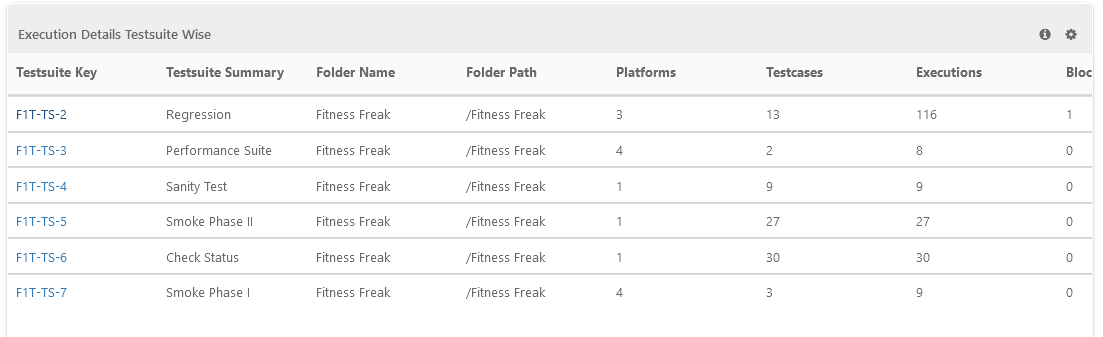
The report shows details of all test cases executed in the selected test suite folder. It displays the drilled-down data from the graph in a table format.
 |