Licensing For SCIM Enabled Users
QMetry allows an admin to choose how to manage user license types, either automatically or manually. The admin can select from the following options:
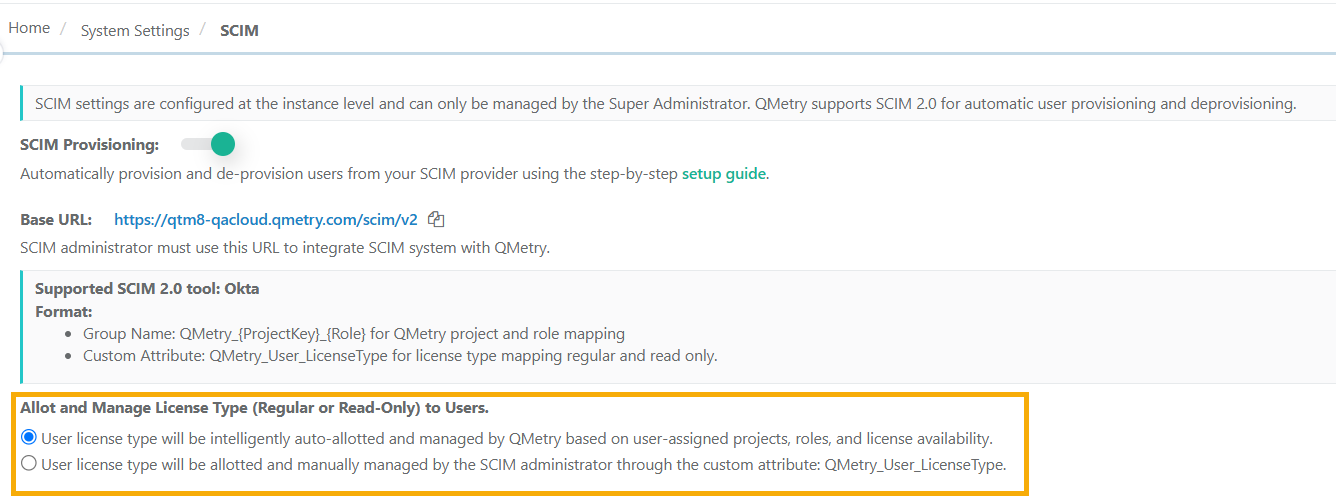
Automatic Management: QMetry automatically assigns and manages user license types based on the user's assigned projects, roles, and available licenses.
If a user is assigned only read-only roles for all projects, QMetry automatically assign a "Read-Only" license, provided there are available Read-Only licenses.
If a user has at least one project with a non-read-only role, QMetry automatically assigns a "Regular" license, as long as Regular licenses are available.
Manual Management: The SCIM administrator can manually assign and manage user license types using the custom attribute QMetry_User_LicenseType.
Allotting and Managing User License Types (Regular or Read-Only)
To allot and manage license types for SCIM enabled users, perform the following steps:
Note
Starting with version 8.27, the Allot and Manage license types for SCIM are configured from System Settings. In versions prior to 8.27, these settings are available under Integration.
 |
Go to System Settings.
Select SCIM.
Enable SCIM Provisioning.
Under Allot and Manage License Type (Regular or Read-Only) to Users, select one of the following options:
Manual management by the SCIM administrator
Auto-allotment and manage License Type
Automatic User License Management
QMetry intelligently assigns and manages user licenses based on the user's assigned projects, roles, and available licenses. Below are different scenarios outlining how licenses are allotted:
User Type | Action | License | Result |
|---|---|---|---|
New User | Assigned Read Onlyroles | Read Only | User gets Read Only access. |
New User | Assigned one or more Non-Read Only roles | Regular | User gets Non-Read only access. |
Read Only user | Assigned another Read Only project | Read Only | User gets Read Only access to new project. |
Read Only user | Assigned a Non-Read Only role | Changes to Regular | Existing access is retained; new or updated role is assigned. |
Regular user | Assigned Read Only or Non-Read Only projects | Regular | Existing access is retained; new/updated role is assigned. |
Regular user | All Non-Read Only roles are removed | Changes to Read Only | Older projects remain as assigned. |
User Type | Action | License Action | Result |
|---|---|---|---|
New user | Assigned only Read Only roles | Regular License | User is activated. |
New user | Assigned Non-Read Only roles | Regular License | User is activated. |
Read Only user | Assigned another Read Only project | Read Only | New project/role is assigned. |
Read Only user | Assigned a Non-Read Only role | Changes to Regular | New/updated role is assigned. Audit log records automatic license conversion. |
Regular user | Assigned a Non-Read Only project | Regular | New project/role is assigned. |
Regular user | Assigned a Read Only project | Regular | New project/role is assigned. |
Regular user | All Non-Read Only roles are removed (only Read Only roles remain) | Remains Regular | User retains the Regular license. SCIM admin must Push the Group under Push Groups tab or reassign/unassign a project for the same user to apply the change. |
User Type | Action | License Action | Result |
|---|---|---|---|
New user | Assigned only Read Only roles | Read Only | User is activated. |
New user | Assigned one or more Non-Read Only roles | Error: Regular license limit exceeded | User is not activated. |
Read Only user | Assigned another Read Only project | Read Only | New project/role is assigned. |
Read Only user | Assigned a Non-Read Only role | Read Only (unchanged) Error: Regular license limit exceeded | New/updated project role is assigned. Automatic license conversion fails and an audit log is recorded. |
Regular user | Assigned a Non-Read Only project | Regular | New project/role is assigned. |
Regular user | Assigned a Read Only project | Regular | New project/role is assigned. |
Regular user | All Non-Read Only roles are removed (only Read Only roles remain) | Changes to Read Only | Existing assignments are retained. Updated project/role is assigned. |