Module Permissions
Note
Starting in version 8.27, permissions have been enhanced with granular access control. Upgrade to version 8.27 or later to use this feature.
The Module Permissions section lets administrators assign granular access rights for the Requirement, Test Case, Test Suite, and Issue modules, controlling what users can view, create, edit, organize, execute, import/export, link, copy, and manage.
Permissions available if Customization App is enabled
The matrix of Modules and Rights are available on the screen. Admins can choose to provide selective rights for the different modules.

Permissions | Implications |
|---|---|
View | It allows you to view the module. |
Create | It allows you to create new records for the module. |
Modify | It allows you to update the details of the module. Archive or Unarchive folder and asset permissions are included under modify rights. |
Delete | It allows you to delete the records of the module. |
Execute | It allows you to execute test case and test suite. |
Import | It allows you to import entities like requirement, test case, test suite and issue. |
Export | It allows users to export entities like requirement, test case, test suite and issue. |
Link | It allows you to link entities like requirement, test case, test suite and issue. |
Copy | It allows you to copy entities like requirement, test case, test suite and issue. |
Versioning | It allows you to create and manage versions of requirement and test case. |
Admin can also choose to Apply or Clear all rights using the following buttons.
Apply All Rights: Assign all rights of all modules to the Role at once.
Clear All Rights: Unselect the selected Permission check boxes in one go.
Note
The permissions are assigned to a Role. It means all the users with that role for that project will have similar rights over the modules.
Test Suite Execution and Modification:
With Execute Permissions:
With "Execute" test suite permissions, you can:
Execute the test suite.
Modify the assignee and planned date, either before or during execution.
However, you cannot alter any other details related to the test suite. This setup ensures that testers can self-assign executions and plan their executions accordingly.
With Test Suite Modify Permissions:
With "Test Suite Modify" permissions, you can:
Modify test suite details.
Update the execution assignee and planned date on the Test Suite Execute page.
You cannot execute the test cases but can assign testers and plan executions as per the release schedule.
Permissions if Customization App is Disabled
Admin can assign "View" and "Modify" rights for the following modules:
Requirement
Test Case
Test Suite
Issue
The matrix of Modules and Rights are available on the screen. Admins can choose to provide selective rights for the different modules.
Permissions | Implications |
|---|---|
View | It allows you to view the module. |
Modify | It allows you to update the details of the module. |
Admin can also choose to Apply or Clear all rights using the following:
Apply All Rights: Assign all rights of all modules to the Role at once.
Clear All Rights: Unselect the selected Permission check boxes in one go.
Note
The permissions are assigned to a Role. It means all the users with that role for that project will have similar rights over the modules.
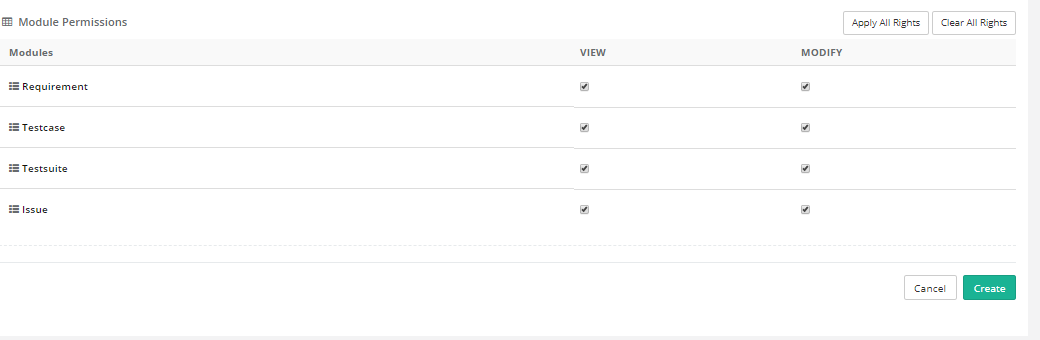
After allocating the rights, click Create to create the user role with the permissions.