System Settings
Note
Starting in version 8.27, permissions have been enhanced with granular access control. Upgrade to version 8.27 or later to use this feature.
System Settings are organization-level permissions that control access to critical administrative functions across your QMetry instance.
Only the Super Admin can configure or modify System Settings permissions. You can view these permissions when you view a role, but you cannot edit them unless you are the Super Admin.
By default, only the Super Admin holds the Modify permission for System Settings. To delegate administrative responsibilities, the Super Admin can update System Roles or Custom Roles to grant you access to specific System Settings.
Note
SCIM (under Identity and Provisioning), Transfer Super Admin (under Administrative Control), and All Dashboards and Gadgets always remain with the Super Admin.
For General and SMTP Settings, if you have only the Audit Compliance View permission and do not have View System Settings, you can download the audit logs but cannot change the audit retention days or the Lifetime Audit Retention setting.
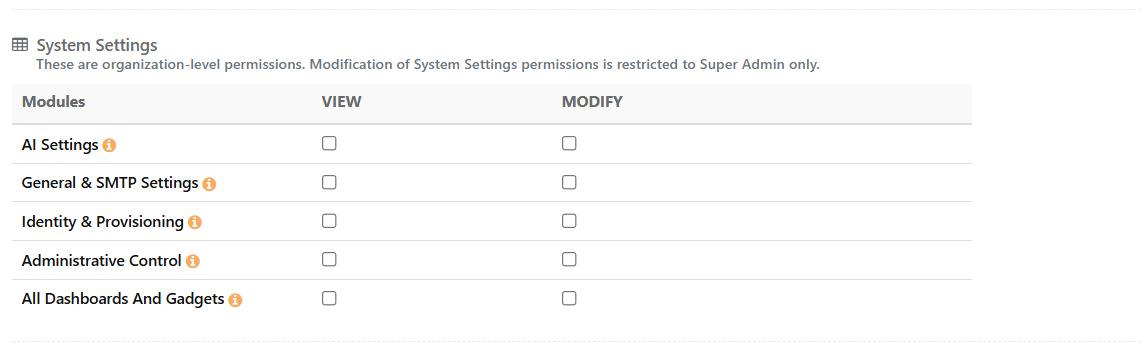
System Settings Permissions
The System Settings category includes the following permission groups. Each group supports View and Modify permissions unless the table notes an exception.
Note
System Settings are organization-level permissions. Only the Super Admin can modify System Settings permissions.
Module | View | Modify |
|---|---|---|
General & SMTP Settings | View General Settings (Two-Step Verification, API Limits and Email Alerts, and Embedded URLs), SMTP Configuration, and Audit Settings. | Change General Settings, SMTP Configuration, and Audit Settings. |
Identity & Provisioning | View the SCIM and LDAP or SSO configurations. | Configure LDAP or SSO. SCIM remains with the Super Admin. |
Administrative Control | View the Transfer Super Admin and Restore Deleted Users options. | Restore deleted users. Transfer Super Admin remains with the Super Admin. |
All Dashboards And Gadgets | View all dashboards and gadgets. | Manage all dashboards and gadgets. Super Admin only. |