Install QMetry Exploratory Testing Add-on
Exploratory Testing is an add-on that enables users to carry out testing while exploring websites.
Benefits of Exploratory Testing
Exploratory Testing helps identify problems with the website or application under test.
The functionality traces actions performed during Exploratory UI testing in browser and converts it into modular code that can be used for automated regression Tests.
Each event and navigation are recorded, which provides ready-to-use Automated Documentation.
Log issues just on a mouse click. Add visuals while logging issues, which makes it easy for the development team to catch the scenario where the application fails.
Install QMetry Exploratory Testing add-on to record events on an application. View results of these recorded sessions on l QMetry Exploratory Testing instance.
Initiate Exploratory Testing
To initiate Exploratory Testing, perform the following steps:
Install QMetry Test Management Exploratory Testing chrome extension.
Generate API Key to log into the extension.
Start exploratory testing and recording sessions through QMetry Exploratory Testing.
Note
Get "Modify" rights for the Exploratory Testing module.
Users with the "View" rights can only view the recorded sessions for the project.
How to Install QMetry Exploratory Testing Add-on
Chrome Add-on
If you are using the Exploratory Testing module the very first time, then perform these steps:
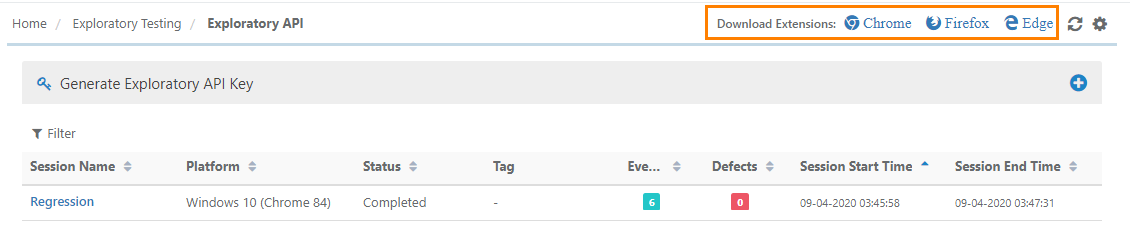
Go to Exploratory Testing and select Exploratory API.
Download and install the l QMetry Test Management Exploratory Testing for Chrome
As an alternate, go to Chrome WebStore and search "QMetry.Click to download the extension.
Firefox Add-on
Pre-requisite: In case of the Server edition of QMetry Test Management, the Exploratory Testing Firefox add-on is compatible with QMetry Test Management v8.7 and above.
If you are using Exploratory Testing for the first time, then perform these steps:
Go to Exploratory Testing and select Exploratory API.
Download and install the QMetry Test Management Exploratory Testing for Firefox.
Alternatively, go to Firefox Add-ons and search “ QMetry Test Management Exploratory Testing”. Install it by hitting the +Add to Firefox.
Edge Add-on
Pre-requisite: In case of the Server edition of QMetry Test Management, the Exploratory Testing Edge add-on is compatible with QMetry Test Management v8.8 and above.
If you are using Exploratory Testing for the first time, then perform these steps:
Go to Exploratory Testing and select Exploratory API.
Download and install the QMetry Test Management Exploratory Testing for Edge.
Download the extension from above the grid.
 |
Alternatively, go to Microsoft edge add ons, and search “QMetry Test Management Exploratory Testing”. Click to install the add-on.