Drill Down Custom Reports
Click the count to drill down custom gadgets. You can access detailed information about the records in the gadgets when analyzing the report. This functionality enhances the usefulness of reports when the reports are shared in meetings. It helps users drill down only to the focused records.
Note
The drill-down functionality is implemented only for Visual Reports.
Cross-project charts are not supported for drill-down.
You can export the drilled-down view in CSV format for easy reference.
Drill-Down Fields in Graphical Reports
When you apply the “Count” math operator to a graphical report (such as Column or Bar charts), the system enables the Drill Down Fields option.
Use this option to select the fields that appear when you drill down into the graph. Include the required Test Entity Fields to display in the custom gadget drill-down view.
Create a Custom Gadget
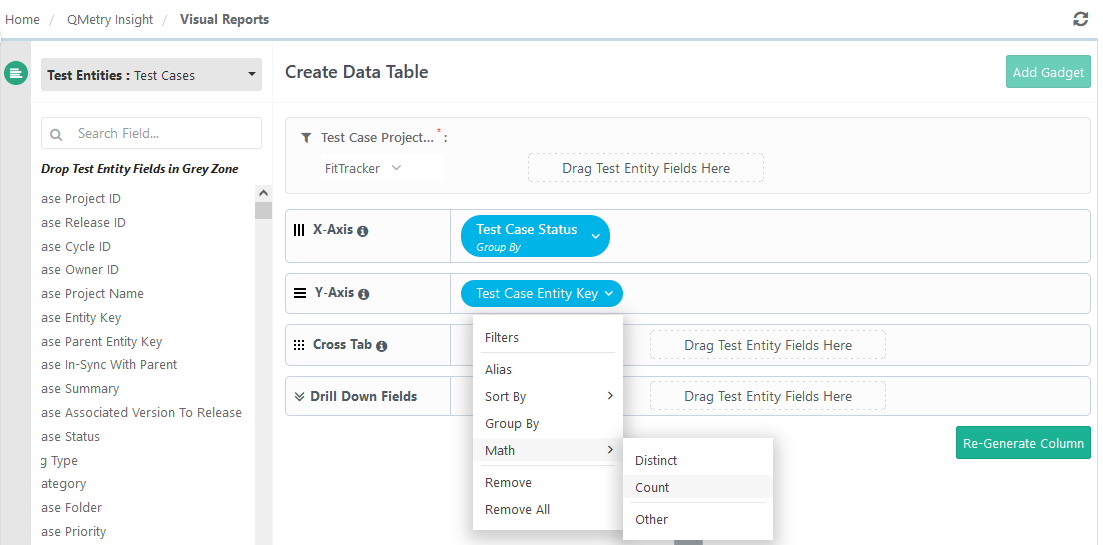 |
Click Add Gadget to create a custom gadget.
The system adds the gadget to the Custom Gadget section.
Add Gadget to a Dashboard
Go to Custom Dashboard.
Open the dashboard to add the gadget.
Add the gadget to the dashboard.
Use Drill-Down in Graphs
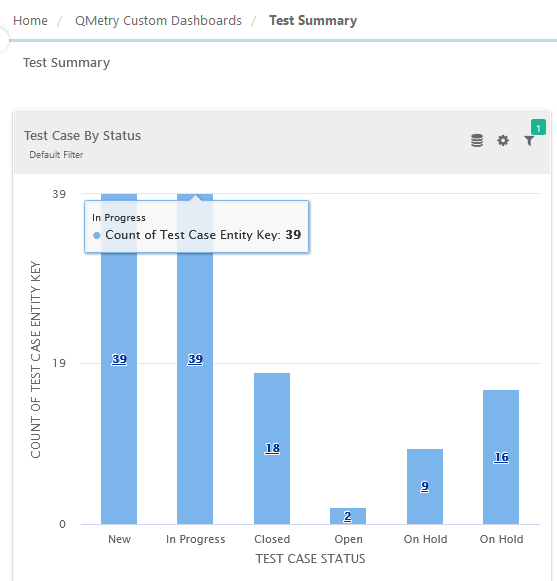 |
Open the dashboard that contains the graphical widget (Bar, Column, Pie, etc.).
Click a section of the graph to view the drill-down details.
It drills down as per the Drill Down Fields selected during the creation of the Visual Report.
You can also export the details to CSV by clicking Download icon at the top.