QMetry Upgrade Guide for RHEL8, RHEL9, RHEL10 and Podman (from v8.16.0.1 and above)
Note
Update the Automation API to the latest version when upgrading QMetry to the latest release.
To update the Automation API, refer to Install Automation API Feature (RHEL8 and Podman ).
This document is intended for customers running QMetry containers on RHEL 8, RHEL 9 or RHEL 10 using Podman. It outlines the steps to upgrade QMetry from an older version to the latest release.
The guide provides detailed instructions for backing up the QMetry database, upgrading the application, updating containers, and integrating Jira.
System Requirements and Pre-requisites
Before upgrading, ensure the following:
MySQL version for both QMetry Reports and QMetry Application is 8.4.8.
Internet connection is enabled on the server.
Upgrading QMetry for RHEL 8, RHEL 9 and RHEL10 using Podman
To upgrade QMetry to the latest release, perform the following steps:
Step 1: Important: Backing up the Existing QMetry Database
To backup your existing QMetry database, perform the following steps:
Create a backup of the "qmetry" database. By default, the backup is saved in the /opt directory.
Run the following command to update the username, password, and backup file location.
podman exec qmetryapp_db sh -c 'exec mysqldump -uroot -p<password> --triggers --routines --hex-blob --single-transaction --lock-tables --no-create-db qmetry' > /opt/qmetry_backup_<date>.sql
Example 9.podman exec qmetryapp_db sh -c 'exec mysqldump -uroot -pqmetry --triggers --routines --hex-blob --single-transaction --lock-tables --no-create-db qmetry' > /opt/qmetry_backup_2021-01-01.sql
Verify that the database is backed up and is available.
Step 2: Downloading the Upgrade Files
Download the required files by following these steps:
Get the latest version of QMetry Upgrade Installer from the Support Portal.
Download the QMetry_RHEL_Installer.zip file to the QMetry Application Server on the host machine.
Step 3: Running Upgrade Script
To run the upgrade script, perform the following steps:
List the running containers with the following command:
podman ps
If podman is not running, use the following command to start it:
podman start qmetryapp_db
podman start qmetry_app_1
Note
Replace the container names with the correct application names as specified in the previous command.
Go to the directory where the zip file is downloaded and copy the file inside the app container using the following command:
podman cp .zip qmetry_app_1:/opt
Note
Your current Tomcat installed path in the container is /home/qmetry/QMetry.
Log in to the container using the following command:
podman exec -it qmetry_app_1 bash
Go to the /opt directory where the QMetry8270.zip file is copied using the command:
cd /opt
Extract the file to the /opt directory, keeping it separate from the current installation path: /home/qmetry/QMetry.
unzip QMetry_RHEL_Installer.zip
Go to the QMetry directory:
cd QMetry_RHEL_Installer
Grant execution permissions to the upgrade script:
chmod +x upgrade.sh
Run the following command to execute the upgrade script:
./upgrade.sh
Online upgrade prompt:
Note
The process may take some time to complete. Kindly be patient and allow it to finish properly.
Table 21. Online InstallationOptions
Allowed Values
Default Value
Description
Do you want to make an online installation? (Y/N)
Y,y,N,n
Y
Enter Y to begin the online upgrade.
Upgrade Main Menu
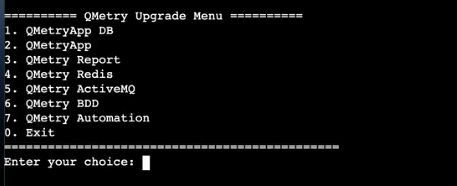
Type 2 to upgrade QMetry Application.
After the process completes, type 0 to exit the installer.
Step 4: Verifying QMetry Container Status
List the running containers using the following command:
podman ps
Restart both containers using the following commands:
systemctl stop qmetryapp
systemctl stop qmetrydb
systemctl start qmetrydb
Wait for around 10 seconds, then execute the following command:
systemctl start qmetryapp
Installing or Upgrading QMetry Jira Add-on
Download the correct Jira add-on version that matches your QMetry version. Refer to the table below to find the compatible Jira add-on version based on your QMetry version.
QMetry Version | Jira-addon version required |
|---|---|
8.27.x | v2.4.3_jira10(Jira Version 10x), 2.4.3 (Jira Version 11x) |
8.26.x | 2.4.2_jira10 (Jira Version 10x), 2.4.2 (Jira Version 11x) |
8.25.x | 2.4.1 (Jira Version 11x), 2.4.1_jira10 (Jira Version 10x) |
8.24.x | 2.3.9_jira9 (Jira Version 9x), 2.3.9 (Jira Version 10x) |
🔗 If the QMetry Jira Integration app is not installed, follow the Install QMetry's Jira Integration App.